


TikTok Basics
TikTok is a service for creating and watching short videos. It allows users to find an audience quickly and get leads without large costs. TikTok remains one of the best platforms for conditionally free traffic (CFT).
At first glance, TikTok algorithms are simple: a user watches a video, and if they like it, recommendations start showing similar clips and channels. However, for effective promotion, you need to understand how this platform works deeper so your content can show up in the feed of the target audience preferably from several accounts.
In this article, we describe basics of working with TikTok: talk about algorithms of moderation and recommendations, data collection, common rules of leading traffic and working with creatives.
Which data TikTok collects
For working with TikTok, it is important to know which user data it collects, and how it moderates content.
When registering, the platform automatically gets information about device:
- IP address;
- user agent and identifier which are digital code that allow websites and apps to identify device;
- mobile operator;
- time zone settings;
- technical characteristics of your device: operating system, configuration, screen resolution, battery status, sound settings, and connected audio device;
- network type: mobile and Wi-Fi;
- approximate location information based on IP address and SIM card.
When registering through the third-party services such as Google or Facebook, the platform can also get the user name, birthdate, phone number and country of account registration.
Users can provide some personal information on their own: email address, passwords, geolocation and contacts.
If a user registers again, the platform links their accounts with a single identifier. If there are more than 3-5 accounts, the algorithms notice this and may apply restrictions: for example, send the accounts to shadow-ban.
How moderation works
One of the key tools for automatic content moderation is metadata collection. Metadata is collected from all user content: videos, photos, and even profile avatars.
Metadata is information about a file, its contents, and its characteristics. This can include camera or device settings used to create the image, date and time of file creation, geolocation, exposure settings, size and format. Using metadata, platform algorithms match data from different users. TikTok also collects information about neighboring pixels, video hashes, file names, analyzes private messages, comments and video content.
The platform uses the collected data to identify spammers, multi-accounts and rule violations. This is part of the anti-fraud system, which prevents videos from being recommended and sometimes blocks accounts.
Rules of publishing user content also play a significant role. Algorithms immediately ban videos containing:
- mention or promotion of prohibited substances;
- demonstration or promotion of weapons, ammunition, and explosive substances;
- demonstration or usage of tobacco products and their analogues;
- political or social advertising;
- demonstration of materials on military topics, justifying war and illegal activities;
- discrimination or incitement to hatred;
- services and goods for adults, explicit scenes;
- demonstration and promotion of counterfeit products;
- shocking scenes, violence, obscene language;
- calls to illegal actions.
Now that we’re familiar with the platform’s main rules and data collection principles, we can better understand how automatic moderation algorithms work. Having this information will allow us to create an effective network of channels and publish content without the risk of being restricted.
Automatic moderation works through image and audio recognition, OCR (optical character recognition), and comment analysis. By identifying violations with sensitive or key words, algorithms can send an account to shadow-ban or block it, and delete a video that violates the rules.
To identify sensitive words, the platform uses large databases containing thousands of words and web services for exchanging hashes. Some tools, such as NCMEC, allow the platform to detect and remove prohibited content immediately upon publication. However, automatic moderation does not always work accurately, and content goes to manual moderation.
Moderators review videos for rule violations, evaluating the description, content and audio. However, they do not check the profile header, which allows users to place links to sources there. Nevertheless, calls in the description or video like «Follow the link in my profile» may raise questions from moderators and lead to tagging the video accordingly.
To avoid a ban, you shouldn’t use trigger words in creatives, descriptions and audio. There is no exact list of such words for gambling and betting, but the biggest risks are associated with mentioning bookmakers, casinos, money and earnings. Here are some spam words to avoid when working with TikTok:
1win, bookmaker company, online casino, casino, winning, gaming passion, risk, gambling, betting, betting industry, bets, casino games, entertainment, online entertainment, gaming business, sport bets, cooperation, opportunity, offer, income, earnings, money, revenue, additional income, financial benefit, Internet income, online earnings, investing, perspective, investment, income from betting, financial growth, monetization, financial perspectives, work offer, partnership, beneficial, mutually beneficial relationships, business perspectives, partnership program, partner, partner relationships.
How recommendation systems work
The platform collects all information about how the user interacts with it. This is done not only to select suitable video topics for the user’s feed, but also to identify bots or suspicious users. Immediate profile setup after registration is likely to negatively impact further use of the platform, as the algorithms will tag the account as suspicious. Typically, a new user does not immediately edit their information, set an avatar, or publish videos. Therefore, such behavior is considered unnatural.
The platform also tracks engagement with the post feed, search and content. It collects information about user preferences based on likes, shares, comments, and videos watched to the end. You can signal your interest to the algorithms, for example, in a different GEO, by using thematic requests and geotags.
The key point is that interest analytics work in both directions. By collecting data on preferences, the platform not only adjusts to them but also predicts what content a user might publish and what audience would be interested in it. For example, if you actively watch videos with cats, your posts will likely appear in the feed of cat lovers.
For this reason, warming up with «white» creatives in the gambling and betting verticals is ineffective. If you first post videos with kittens and then switch to casino, the videos will be suggested to users who watch kittens. Accordingly, performance metrics will also be extremely low such as likes, shares, comments, views. This will confuse the algorithms, and the videos will not be promoted in recommendations.
Preparing device for work
Now that we understand the principles of TikTok recommendations and moderation, we can establish a procedure required for successful starting with multiple accounts:
- Change device ID.
- Remove SIM card from device and set it up for needed GEO.
- Register in iCloud/Google using the number of needed GEO.
- Install, set up and check proxy.
We’ll analyze this procedure in more detail.
ID change
The platform collects device data from which the user logs in. The most important information is ID as it allows the platform to identify two different smartphones. If many accounts are created using the same ID, they will be on the ban list.
To change your ID, you can use special apps or reset your device to factory settings. Each reset will format your data and generate a new number. Detailed instructions on how to reset your iOS device to factory settings is available with the link. Instructions for Android may vary depending on your device model.
SIM card removal and replacement, device setup
The SIM card determines the mobile operator and the approximate device location. For example, if we plan to work with Kenya fromUK, the SIM card from the phone should be removed. If we are working with Kenya directly from the country, using a local SIM card will increase the algorithms’ trust.
You should also set the language and time of the target GEO on the device and disable geolocation services.
Account creation for specific GEO
You can create an Apple ID or Google account for the required GEO by registering with a number from the chosen country. For example, if a webmaster plans to work in the US, the Google account should be registered with a number from one of the American operators.
Proxy setup and check
A proxy is an agent server between a user and an Internet resource that allows you to hide the real IP address and ensure anonymity online. When working with TikTok, it is better to use residential mobile IPv4 proxies as they are widely available and compatible with most services.
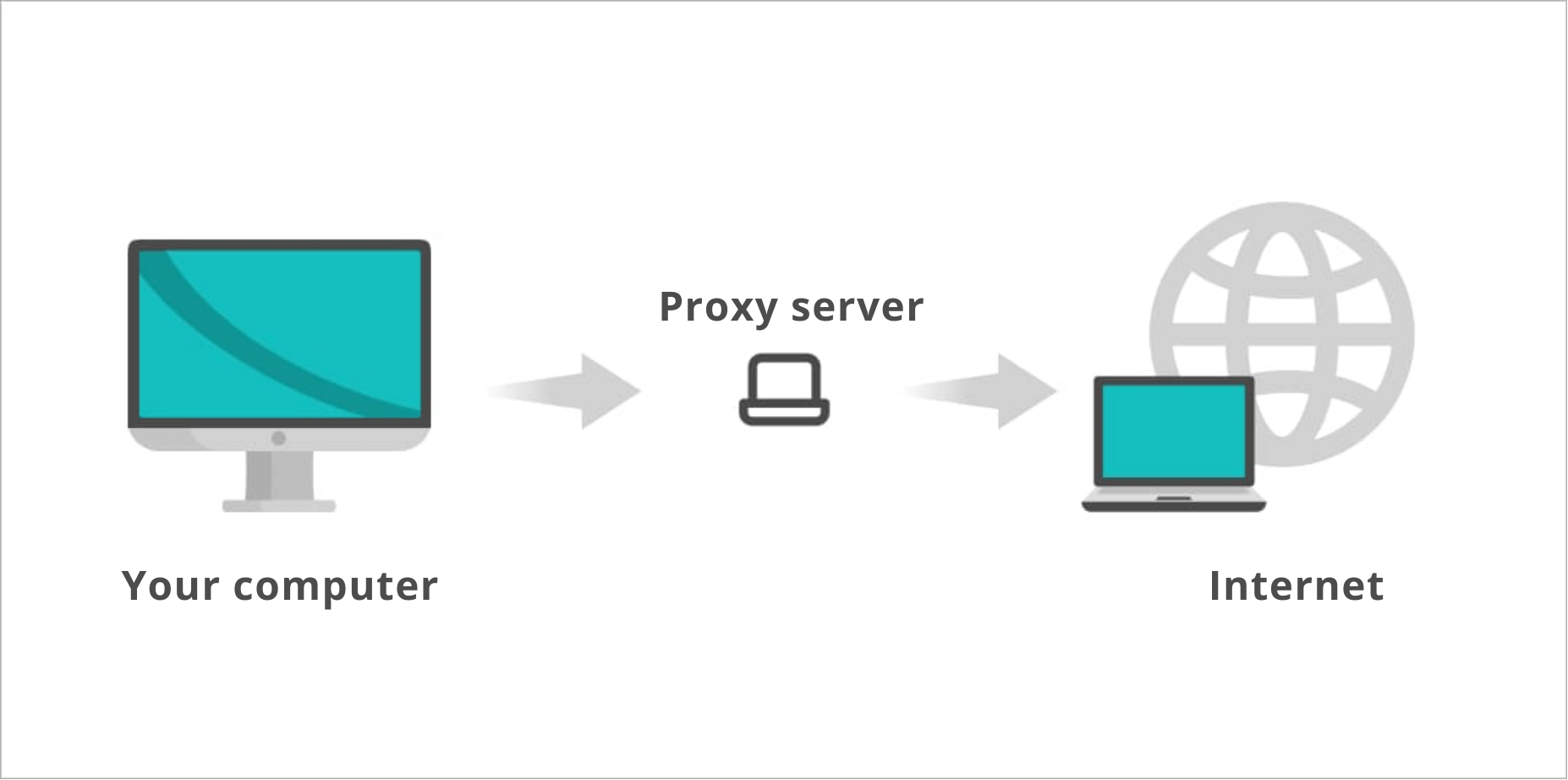
It is important to use individual proxies to bypass anti-fraud systems and to avoid blocking. Each account should have its own IP address.
You should also check the quality of the proxies if they actually provide IP addresses from the required region and protect the data passing through them. There are special services for this, one of them is available with the link.

Proxy should be installed through the special apps such as SocksDroid for Android, for iOS — Potatso or ShadowRocket.
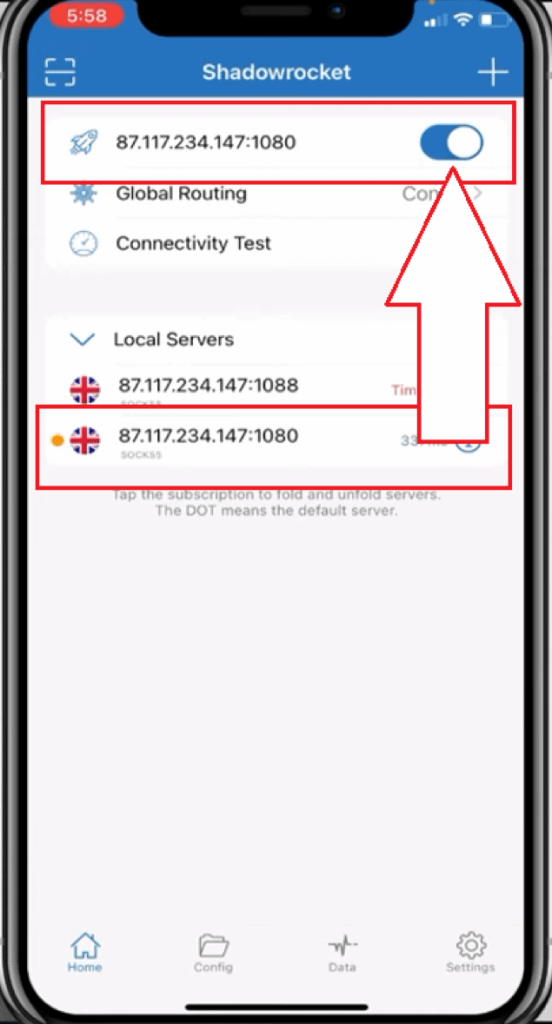
Some webmasters set up proxies through USB adapters and Wi-Fi, but this method is expensive and not always effective. It is also not recommended to use the Internet distribution through a hotspot, such connection format is easily detected by the algorithms.
Alternative option — modes
Alternative option for working with the multi-account is using a special mode. Mode is a modified version of the official app that offers users additional opportunities: for example, downloading a video without watermarks or bypassing regional restrictions. It is installed to the phone not through the market but through the Scarlet certificate (for iOS) or APK file (for Android). The mode either has a pre-installed geolocation (usually the US), or there is an option to change the geolocation for a fee.
There are different opinions about the modes: some find it more reliable to pass each stage of device setup manually, some think that modes don't allow the platform to apply shadow-ban to accounts.
Creating accounts
After the app is downloaded, the user can find the registration menu. The platform pays attention to the naturalness of the user’s behavior. Therefore, the best option for authorization is using an Apple or Google account.
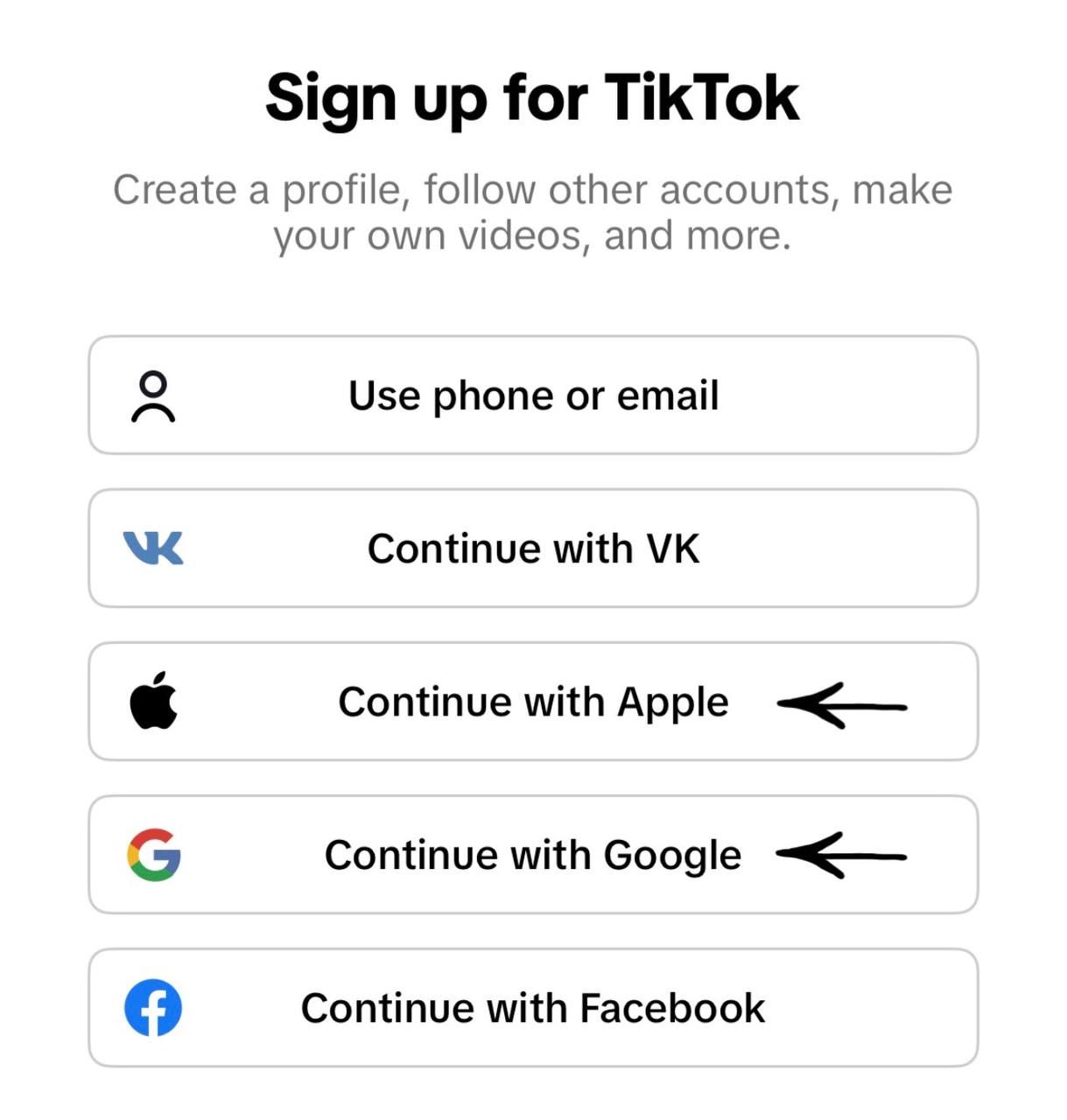
It is not recommended to create more than 3-5 accounts on one device. Subsequently, avoid crossing accounts on devices that have already been used. It is better to keep previously created accounts on the «native» phone or transfer them under the same IP to an anti-detect browser, such as Dolphin-anty. To organize information about accounts, it is recommended to create a simple table in Google Sheets or Excel.
After the first authorization, TikTok suggests selecting interests. Here, you should choose directions close to our sphere such as «Motivation and advice», «Automobile transport», «Travelling».
While using the platform, it will request access to your location, activity in other apps and on third-party websites, and contacts. Giving such permissions is strictly prohibited.
After registration, you should familiarize yourself with the platform. Behaving naturally is important. You should give some likes, «get stuck» on some video by rewatching it several times, and review the comments sometimes. You can go to the authors’ profiles, watch their clips, and then get back to the main feed.
After the first authorization and activities, it is better to close the app for some time. This can be done from 15 minutes to one day. Your actions should convince the platform that it is being used for the first time.
After the break, you need to check your IP through a checker, open the app, scroll the feed for a few minutes, and then start filling out your profile.
When description, username and avatar are added, you need to scroll the feed again, and take a little break. Afterward, you can start publishing the content.
How to publish content
You shouldn't upload 5-6 videos in one day. The algorithms will consider such activity suspicious, and the views will stop at 500-600, or the channel might be blocked. Therefore, it's better to start with 1-2 videos a day with intervals of 5-10 minutes.
Making content unique
TikTok reads data from user content, so everything uploaded to the platform, including profile photos, should be unique. You can make content unique in three ways:
- Clean the file metadata: remove the creation date, device data, and geotags.
- Apply noise and effects to the image.
- Change the internal file characteristics and modify the image parameters without changing its appearance.
You can make content unique using your code in FFmpeg — this open-source program allows you to work with video and audio, for example, by adding special effects. Specialized Telegram bots, such as @unikcreo_bot, are also suitable for making content unique. You can verify the metadata cleanup using the metadata2go service — if all steps are performed correctly, all metadata fields for the file will be empty.
Making videos unique with CapCut
CapCut is one of the most popular mobile video editors. However, it is presumed that recently the service has been transmitting the metadata of created files to TikTok's moderation system. This increases the risk of a shadow ban or even full block of accounts, especially if you publish the same content on multiple sources.
To avoid this, it is recommended to use the AI service Wink.
Steps:
- Edit the video in CapCut. Recommended parameters: 1080p, 30 fps, no HDR, no watermarks. Save it under a system name, for example: VID_20251105_123456.mp4.
- Upload the video to Wink, select the format (.mp4 or .mov), and the bitrate (4–8 Mbps for video, 128–192 kbps for audio).
- Select an AI video enhancement command: for example, noise reduction or detail upscale.
- Download the file. Done — there are no more CapCut «traces» left in the metadata.
For additional data cleanup, you can use the FFmpeg service: upload the video to the program and enter the command «ffmpeg -i wink_output.mp4 -map_metadata -1 -c copy clean.mp4» into the console. This will remove all tags.
Format and retention
The best format in terms of views and engagement is photo carousels. Photos can contain text that the user won’t have time to read during automatic scrolling. This forces them to scroll back or watch the entire video for it to automatically restart. Some webmasters use this strategy to make users scroll the carousel multiple times to remember a promo code.
If the content is not suitable for the carousel format, you can increase retention in other ways. For example, you can add hints of an unexpected ending or a streamer’s wild reaction to slots in the video. The main goal is to keep the viewer’s attention until the end of the video.
Content adaptation for target audience
The most important aspects when promoting content on any platform are qualified and unique creatives. It is exactly original content clear for the audience that can bring you the best results.
To promote creatives, you can use trend music and geotags of the chosen GEO. You can select needed tracks using the service Countik, and take geotags from popular videos of the feed. These are usually large shopping malls, popular cities, beaches or prestigious regions. For example, in content targeted at the United States, you can often find tags like Miami or Manhattan.
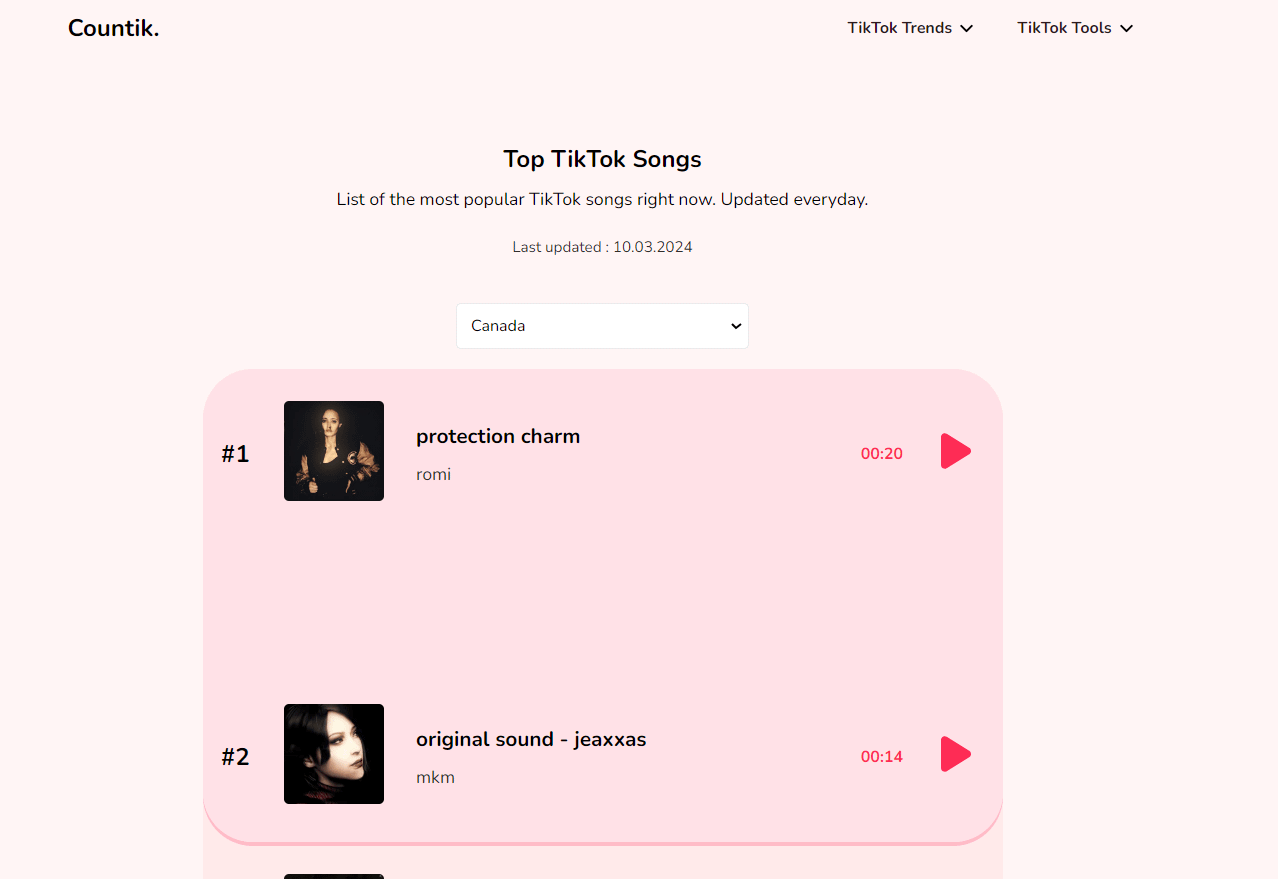
Using Countik, you can also find the most popular authors of the needed GEO, and use their tags for promotion.
Analysis of local specifics
The most complicated thing about making creatives is their adaptation to the local specifics, understanding of the culture, trends and memes. Many make a mistake using only common keywords: casino, bets, Lucky Jet, Aviator, and similar ones. This way, they miss a significant part of the audience.
A deeper study of the regional specifics will allow you to scale the target audience. For example, American teenagers tend to make jokes about the Russian Mafia, and to earn some money as they don’t have enough pocket money. They also like bright, comic and absurd content. Therefore, if we led traffic from the USA, our creative could look like it is shown on the image below:

To find out the interests of the target audience, you can use services for learning languages with native speakers. HelloTalk is suitable for this as it is an app for language exchange and communication. The HelloTalk community is very open and friendly, so your conversation partners will be happy to answer your questions about their language, culture and current trends.
When to publish content
The timing of content publication plays a key role in landing in recommendations and ensuring the audience is ready to engage with and react to your creative. The Hootsuite team, in collaboration with the data analytics agency Critical Truth, conducted a comprehensive study. They analyzed over a million social media posts across various industries and platforms and determined the best time to publish for maximum engagement.
The most relevant times for publishing content on TikTok by day of the week (valid for the local time of all time zones):
- Monday: 10:00 –12:00
- Tuesday: 12:00 – 16:00
- Wednesday: 12:00 – 13:00
- Thursday: 16:00 – 18:00
- Friday: 21:00 – 23:00
- Saturday: 22:00 – 00:00
- Sunday: 00:00 – 01:00, 12:00 – 14:00
Technical recommendations
For live third-person filming, you can use wider shots or 0.5x zoom — this will blur small elements like cashout or deposit screens.
Content should only be uploaded from a mobile device and only using mobile internet or a proxy connection. Editing video inside TikTok is not recommended — you should only change the preview frame.
Upload formats:
- .mp4 for Android;
- .mov for iOS.
The recommended system for video publication is Android. When publishing through it, the image quality will be higher and more stable across all devices.
Also, pay attention to video quality and frame rate: algorithms are most lenient towards high-resolution videos with a frame rate of 30 fps. Consider regional specifics as well: if you are working with a GEO where internet speed is low, it is better to publish videos in a lower quality to increase their completion rate.
Hashtags
Hashtags group videos by topics and trends, and they influence how TikTok understands and recommends your content.
It is best to combine popular and highly specialized hashtags. Broad-profile hashtags will help you cover current topics. Niche hashtags directly appeal to your target audience.
To find the best hashtag combinations, we recommend using tools like Trend Discovery. You can filter them by industry, region, and performance metrics to see what is getting popular.
It is important not to overload publications — three to five carefully chosen hashtags often show better results than 20. The TikTok algorithm prefers clear signals.
Metadata and SEO
Metadata determines how content is classified both within TikTok and in traditional search engines. This includes the video file name, captions, on-screen text, spoken words, and hashtags.
Video information is one of the main factors used to determine discoverability, so it is important to pay attention to ensuring that your metadata aligns with search query intent.
Before uploading, you can rename the file, giving it a descriptive name corresponding to key search terms (e.g., how_to_play_aviamasters.mp4). This improves TikTok's ability to index the video and match it to relevant search queries.
Captions and overlay text should include naturally placed SEO keywords that reflect what your target audience might be typing into TikTok's search function.
Redirecting audience to the website or channel
Audience can be transferred either from TikTok or through the Telegram channel. TikTok has restrictions here: a clickable link can only be placed in the profile if there are 1000 followers.
Obtaining activity in an artificial way or creating a business account will negatively affect the promotion, therefore, we should use an alternative approach. For this, you need to put a tag of the second channel having the needed number of followers in the description or comments under the video on the main channel. Such a channel can be created or purchased on the special stock market. In the description of the second channel, you can place a link to Telegram, landing page or micro landing.
A micro landing is a convenient and free tool for link protection. In one micro landing, you can place links both to the channel and the website, as well as to the signal bot, for example. They are rarely banned, and look secure for users. Details on creating micro landings on popular platforms (Linktree, Heylink, Tap.bio) are described in this article, as well as information on other tools for protecting referral links.
Shadow ban on TikTok
A shadow ban on TikTok is a temporary restriction that is applied to an account for violating the platform terms and conditions. Reasons can differ: copyright violation, spam tags, mass likes or followings, frequent video deletion. An account that is shadowbanned temporarily stops showing up in recommendations for users who do not follow it.
Shadow ban signs:
- sudden decrease in views;
- videos are not appearing in the recommendations feed;
- sudden drop of followers growth;
- account's comments under its videos cannot be seen by other users;
- new videos take a long time to pass moderation.
You can check if an account is under a shadow ban using the bot @mrbeast_tiktok_bot. It shows statistics for each video: likes, views, saves, as well as the account's geolocation and language. Note: the bot works in Russian, so a translator may be required.
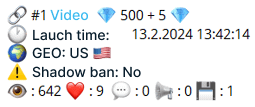
A shadow ban is a temporary restriction which can last from 24 hours to 30 days. Therefore, a sudden decrease in views is not a reason to leave the account. On the contrary, it is important to continue publishing clips and «warming up» the channel. To avoid decrease in traffic volumes, it is necessary to have some more channels that can be launched for working, if needed.
Protection against shadow ban by double publication method
The double publication method allows you to bypass TikTok algorithm restrictions if a video is mistakenly identified as content violating the platform's rules.
To bypass restrictions:
- Publish the promotional video. First, upload the video that risks running into platform restrictions. You can place the necessary information (e.g., a link in the bio) in the description or in the video.
- Publish a "clean" video. Some time after publishing the first video, upload a second one. This video should be regular content consistent with your style, without any hints of prohibited topics.
- Redirect the audience. Add a call-to-action to the second video or its description to watch the previous video. This can be text, a voice message, or any other way that encourages viewers to navigate to the first video.
Example:
A blogger publishes an ad video and a link to their Telegram group. Initially, it gains about 600 views. They then publish a trending video with a popular dance, and at the end, they call on viewers to watch the previous video. This trending video gains 3,000 views and hits the recommendations. Soon after, the promotional video reached 4,500 views, and the trending video reached 9,300.
Conclusion
In this material, we have analyzed common, basic principles of working with TikTok. There are many options for interacting with the platform, but successful launch is impossible without following these simple rules.
TikTok is always developing, its algorithms of recommendations and moderation constantly change, therefore, we should look for new ways of working with it, and new schemes. There is no one algorithm for a successful launch, and the outcome will depend on our attention to details, readiness to adapt to changing conditions, and ability to analyze results.
Found this useful? Give it a thumbs up and subscribe to 1win Partners' socials. Your feed will thank you for the expert insights.


You can also read

1win Partners Advertising Tools: Referral Link and Promo Code
We explain how to create and set up a referral link and promo code in the personal account of the 1win Partners program.
 55
55
Referral Link Updates
How to avoid referral link restrictions imposed by moderation algorithms? We share effective tips.
35
Building an Effective Team
Building aт arbitrage team is a crucial step for anyone looking to scale their business. A real team is an asset that helps you grow and earn more, and not just a formality that drains your resources.
 17
17